
 Anders Jenbo
3752eca470
Anders Jenbo
3752eca470
|
5 years ago | |
|---|---|---|
| .circleci | 5 years ago | |
| .github/ISSUE_TEMPLATE | 5 years ago | |
| 3rdParty | 5 years ago | |
| CMake | 5 years ago | |
| DiabloUI | 5 years ago | |
| Packaging | 5 years ago | |
| Source | 5 years ago | |
| SourceS | 5 years ago | |
| SourceT | 5 years ago | |
| SourceX | 5 years ago | |
| build | 6 years ago | |
| docs | 5 years ago | |
| .clang-format | 6 years ago | |
| .clang-tidy | 5 years ago | |
| .editorconfig | 5 years ago | |
| .gitignore | 6 years ago | |
| .travis.yml | 6 years ago | |
| Brewfile | 7 years ago | |
| CMakeLists.txt | 5 years ago | |
| CMakeSettings.json | 6 years ago | |
| LICENSE | 8 years ago | |
| README.md | 5 years ago | |
| appveyor.yml | 5 years ago | |
| codecov.yml | 6 years ago | |
| defs.h | 5 years ago | |
| doxygen.config | 6 years ago | |
| enums.h | 5 years ago | |
| structs.h | 5 years ago | |
| types.h | 6 years ago | |
README.md






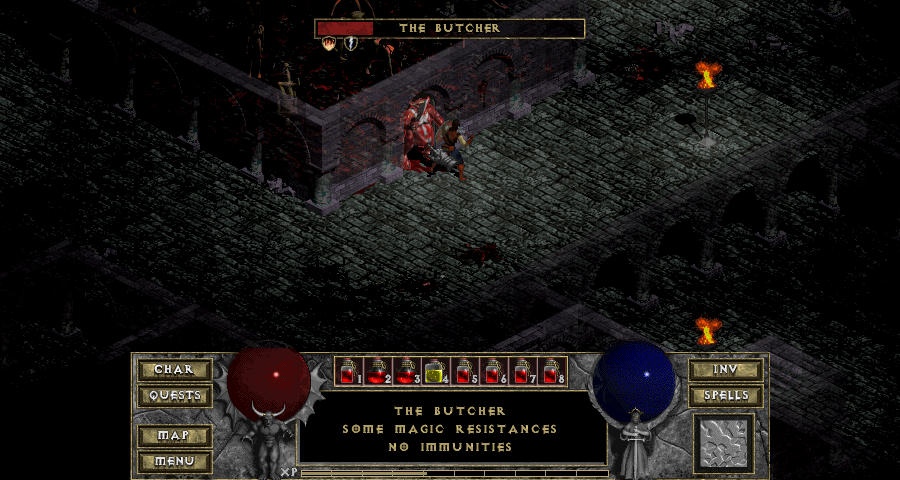
(The health-bar, and XP-bar are off by default, but can be enabled in the ini-file. Widescreen and transparency can also be disabled if preferred)
How To Install:
- Download the latest DevilutionX release, or build from source
- Copy diabdat.mpq from your CD or GoG installation (or extract it from the GoG installer) to the DevilutionX install folder or data folder. The DevilutionX install folder is the one that contains the DevilutionX executable. The data folder path may differ depending on OS version and security settings, but will normally be as follows:
- macOS
~/Library/Application Support/diasurgical/devilution - Linux
~/.local/share/diasurgical/devilution/ - Windows
%AppData%\Roaming\diasurgical\devilution
- macOS
- Install SDL2, SDL2_mixer and SDL2_ttf (included in macOS and Windows releases):
- Ubuntu/Debian/Rasbian
sudo apt-get install libsdl2-ttf-2.0-0 libsdl2-mixer-2.0-0
- Ubuntu/Debian/Rasbian
- Run
./devilutionx
Installig on Ubuntu via PPA
- Installing and playing on Ubuntu
-
Add DevilutionX stable or DevilutionX git PPA repository
sudo add-apt-repository ppa:devilutionx/stable sudo add-apt-repository ppa:devilutionx/dev -
Install DeviliutionX
sudo apt update sudo apt install devilutionx -
For Diablo I: copy diabdat.mpq file to
~/.local/share/diasurgical/devilution/folder -
For Diablo Hellfire: copy hellfire.mpq, hfmonk.mpq, hfmusic.mpq, hfvoice.mpq files to
~/.local/share/diasurgical/devilution/folder -
Additionally for better widescreen support you can copy devilutionx.mpq file to
~/.local/share/diasurgical/devilution/folder -
Run DevilutionX or DevilutionX Hellfire from menu to start game
-
Building from Source
Want to compile the program by yourself, grate! Simply follow the build instructions;
Multiplayer
- TCP/IP only requires the host to expose port 6112
- UDP/IP requires that all players expose port 6112
All games are encrypted and password protected.
Controller support
DevilutionX supports gamepad controls.
Default controller mappings (A/B/X/Y as in Nintendo layout, so the rightmost button is attack; A ○, B ×, X △, Y □):
- Left analog or D-Pad: move hero
- A: attack nearby enemies, talk to townspeople and merchants, pickup/place items in the inventory, OK while in main menu
- B: select spell, back while in menus
- X: pickup items, open nearby chests and doors, use item in the inventory
- Y: cast spell, delete character while in main menu
- L1: use health item from belt
- R1: use mana potion from belt
- L2: character sheet (alt: Start + L1 or ←)
- R2: inventory (alt: Start + L2 or →)
- Left analog click: toggle automap (alt: Start + ↓)
- Start + Select: game menu (alt: Start + ↑)
- Select + A/B/X/Y: Spell hotkeys
- Right analog: move automap or simulate mouse
- Right analog click: left mouse click (alt: Select + L1)
- Select + Right analog click: right mouse click (alt: Select + R1)
- Select + L2: quest log (alt: Start + Y)
- Select + R2: spell book (alt: Start + B)
For now, they can be re-mapped by changing SourceX/controls or by setting the SDL_GAMECONTROLLERCONFIG environment
variable (see
SDL_GameControllerDB).
Contributing
Mods
List of known mods based on DevilutionX
F.A.Q.
Wow, does this mean I can download and play Diablo for free now?
No, you'll need access to the data from the original game. If you don't have an original CD then you can buy Diablo from GoG.com. Alternately you can use spawn.mpq from the shareware version to play the shareware portion of the game.
What game changes does DevilutionX provide
DevilutionX's main focus is to make the game work on multiple platforms. An additional goal is to make the engine mod friendly. As such, there are no changes to gameplay, but we will be making some enhancments to the engine itself. For example, the engine now has upscaling, unlocked fps, controller support, and multiplayer via TCP.
For a full list of changes see our changelog.
Is 1080p supported?
Yes, the game will automatically adjust to your screen. This can be further adjusted in the game ini file.
What about Hellfire?
Yes, you can play both Hellfire, regular Diablo, or the shareware version all from the same installation of DevilutionX.
Does it work with Battle.net?
Battle.net is a service provided by Blizzard. We are not associated with them, so we have not worked on intergrating with their service.
Credits
- The original Devilution project Devilution
- Everyone who worked on Devilution/DevilutionX
- Nikolay Popov who provided new backgrounds and icons.
- And a thanks to all who support the project, report bugs and help spread the word <3
Legal
DevilutionX is released to the Public Domain. The documentation and functionality provided by DevilutionX may only be utilized with assets provided by ownership of Diablo.
The source code in this repository is for non-commerical use only. If you use the source code you may not charge others for access to it or any derivative work thereof.
Diablo® - Copyright © 1996 Blizzard Entertainment, Inc. All rights reserved. Diablo and Blizzard Entertainment are trademarks or registered trademarks of Blizzard Entertainment, Inc. in the U.S. and/or other countries.
DevilutionX and any of its maintainers are in no way associated with or endorsed by Blizzard Entertainment®.